ES基础
修改配置文件
配置文件所在目录:/etc/elasticsearch/
1.内存大小
vi /etc/elasticsearch/jvm.options

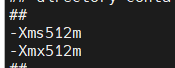
将这两行前面的警号删除,其中Xms定义最小使用内存,Xmx定义最大使用内存
说明:默认,ES最高使用系统内存的50%,如果你的服务器还有其它服务,建议配置这两个参数。 建议:两个参数设置为一样,如果不一样可能会导致heap resize时产生停顿,最大内存不要超过机器内存总量的50%(因为要预留内存给lucene进行全文检索),并且最大内存不要超过32G,超过32G会开启一个内存对象指针压缩功能,从而导致性能下降
2.修改常规配置,例如端口号、数据路径、日志路径、集群信息等
# Path to log files:
#
path.logs: /var/log/elasticsearch

# By default Elasticsearch listens for HTTP traffic on the first free port it
# finds starting at 9200. Set a specific HTTP port here:
#
#http.port: 9200

# Allow HTTP API connections from anywhere
# Connections are encrypted and require user authentication
http.host: 0.0.0.0  ##这个表示监听全部ip,如果没有设置密码认证,这样配置万万不可。
ES常用操作
ES_P=”TKtp0B-QJVixjm3y58VF” 表示ssl生成的密码
1.查看集群状态
curl -u elastic:"$ES_P" -X GET 'http://localhost:9200/_cluster/health?pretty'
2.查看集群成员列表
curl -u elastic:"$ES_P" -X GET 'http://localhost:9200/_cat/nodes?v'
3.查看索引列表
curl -u elastic:"$ES_P" -X GET 'http://localhost:9200/_cat/indices?v'
4.创建索引
curl -u elastic:"$ES_P" -X PUT 'http://localhost:9200/test-index' #索引状态为yellow,这是因为该索引有一个副本
5.修改副本数
curl -u elastic:"$ES_P" -X PUT -H "content-type:application/json;charset=utf-8" http://localhost:9200/test-index/_settings -d '{"number_of_replicas": 0}' #单机模式下,副本改为0
6.查看索引mapping、setting和索引文档数
curl -u elastic:"$ES_P"  'http://localhost:9200/test-index/_mapping?pretty'
curl -u elastic:"$ES_P"  'http://localhost:9200/test-index/_settings?pretty'
curl -u elastic:"$ES_P"  'http://localhost:9200/test-index/_count'
7.增加mapping
curl -u elastic:"$ES_P" -X POST -H "content-type:application/json;charset=utf-8"  'http://localhost:9200/test-index/_mapping' -d '{
      "properties" : {
        "content" : {
          "type" : "text"
        },
        "name" : {
          "type" : "keyword"
        }
      }
}
8.新增数据
curl -u elastic:"$ES_P" -X POST -H "content-type:application/json;charset=utf-8"  'http://localhost:9200/test-index/_create/1' -d '{
    "name": "aming",
    "content": "linux"
}'
9.查看索引内容
curl -u elastic:"$ES_P" -X GET  'http://localhost:9200/test-index/_search?pretty'
#增加条件id为1
curl -u elastic:"$ES_P" -X GET 'http://localhost:9200/test-index/_doc/1?pretty'
10.清空索引内容
curl -u elastic:"$ES_P" -X POST  'http://localhost:9200/test-index/_delete_by_query?pretty' -H 'Content-Type: application/json' -d '{
  "query": {
    "match_all": {}
  }
}'
11.删除单条索引
curl -u elastic:"$ES_P" -XDELETE 'http://127.0.0.1:9200/index_name'
12.删除多条索引
curl -u elastic:"$ES_P" -XDELETE 'http://127.0.0.1:9200/index_01,index_02'
13.查看分片信息
curl -u elastic:"$ES_P" -XGET 'http://127.0.0.1:9200/_cluster/allocation/explain?pretty'